TL;DR
- The big three: Flipkart The Big Billion Days (BBD), Amazon Great Indian Festival (GIF) and Myntra Big Fashion Festival (BFF). AJIO, Nykaa, Meesho and Snapdeal run their own sales too.
- Expect more orders: some sellers get 2x, some 5x and some even 10x their normal orders.
- Three things to manage: stock, order processing and packing. Then returns and RTO after the sale.
- Biggest risk: going out of stock. A product out of stock stops getting orders.
- Most manual work: Amazon and Myntra, where every order is processed one by one. Flipkart and the others allow bulk steps.
- HappySellers keeps inventory in one place, processes orders in bulk, and with auto processing processes them on a schedule while you pack.
Every year the festive season brings the biggest sales of the year on Indian marketplaces. Buyers get big discounts, so they buy more. For sellers, that means far more orders than on a normal day, and far more work to ship them on time.
This guide covers what to expect from the 2027 festive sales and how to get your stock, orders, packing and returns ready. If you want the order work off your plate, HappySellers processes your marketplace orders in bulk and hands you every label in one PDF. You can try it free on your real orders before the sale starts.
It is written for small sellers shipping a few orders a day and for large sellers shipping hundreds or thousands. The rush hits both. It just costs more hours as you grow.
The 2027 festive sales: which marketplace runs which sale
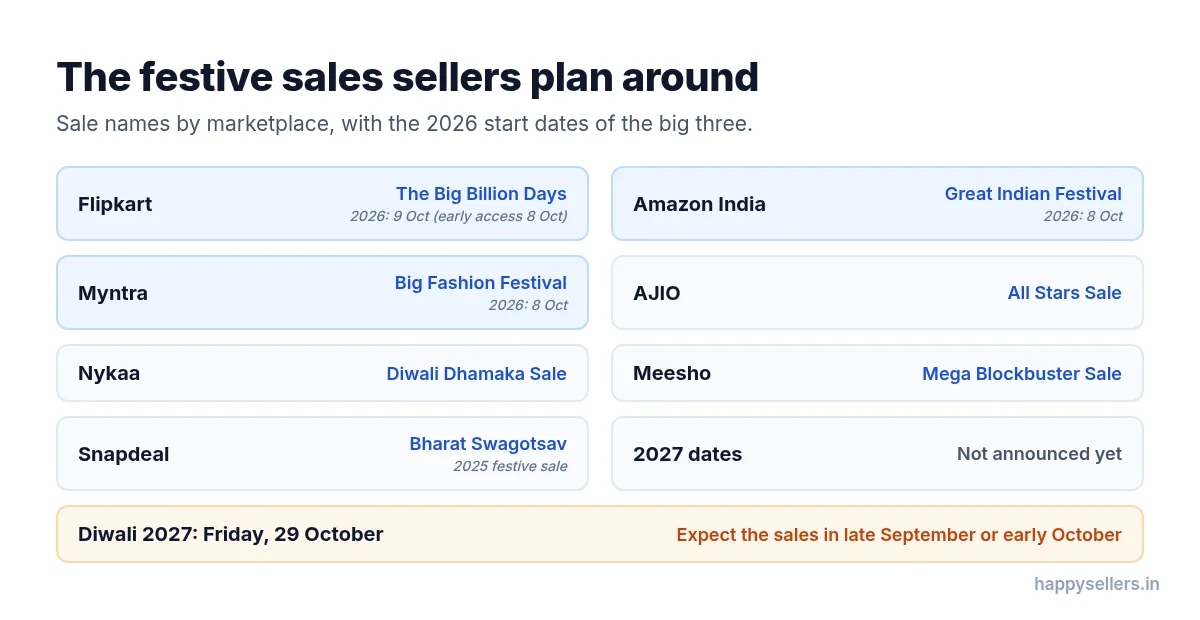
Each marketplace has its own festive sale. These are the ones sellers plan around:
| Marketplace | Festive sale |
|---|---|
| Flipkart | The Big Billion Days (BBD) |
| Amazon India | Great Indian Festival (GIF) |
| Myntra | Big Fashion Festival (BFF) |
| AJIO | All Stars Sale, and a Diwali sale |
| Nykaa | Diwali Dhamaka Sale |
| Meesho | Mega Blockbuster Sale |
| Snapdeal | Bharat Swagotsav (its 2025 festive sale) |
When will the 2027 sales start?
The 2027 dates are not announced yet. Marketplaces usually announce them a few weeks before the sale.
What we do know is the pattern. In 2026, Amazon Great Indian Festival and Myntra Big Fashion Festival started on 8 October, and Flipkart Big Billion Days opened on 9 October, with early access for members on 8 October. These sales run in the weeks before Diwali, and Diwali 2027 falls on Friday, 29 October. So expect the 2027 sales in late September or early October, and plan your stock before then.
We will update this guide when the marketplaces announce the dates.
How many more orders should you expect?
There is no single number. It depends on your category, your prices and how ready you are.
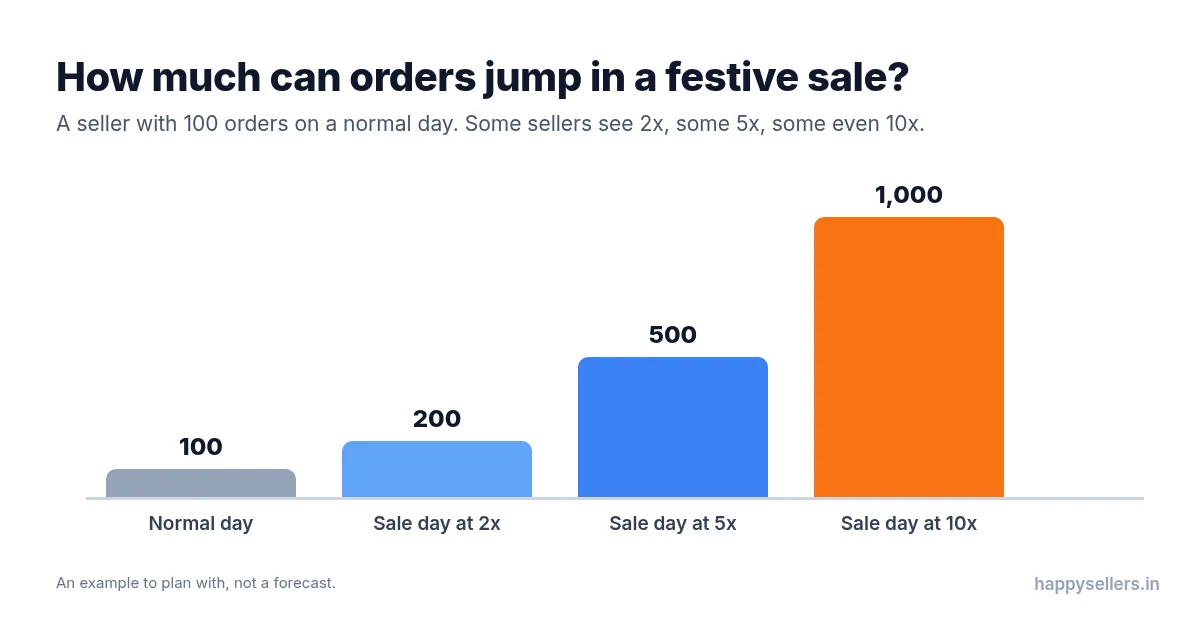
What sellers tell us is this: some sellers get 2x their usual orders during these sales, some get 5x, and some even get 10x. A seller who ships 100 orders on a normal day could be looking at 200, 500 or 1,000 orders a day.
That jump lands on three jobs at once:
- Stock: keeping enough of every product so orders keep coming.
- Order processing: accepting orders and getting their labels and invoices.
- Packing: picking the right products and packing every order before the dispatch deadline.
Plan for the high end. Running short of stock, labels or people on day one is much harder to fix than having a little extra.
Stock first: do not go out of stock
The biggest problem during a festive sale is products going out of stock. When a product shows out of stock, it stops getting orders, right when buyers are ready to spend. That hurts sellers more than anything else in the sale.
So keep your inventory in sync across every marketplace. When you know your real stock, you know which products to restock before and during the sale.
- Find your fast movers. Look at what sold most last season and in recent weeks.
- Stock them early, before the sale, not on the first sale day.
- Keep one stock count. The same product on Flipkart, Amazon and Myntra should not have three numbers that drift apart.
- Keep packing material ready: boxes, polybags, tape and label rolls.
HappySellers Inventory Management links your Flipkart, Amazon and Myntra catalogs into one master product and one master SKU, so your stock is one number. Orders from every connected marketplace are recorded against that SKU, and you can update stock on every marketplace from one place. Read more in our guide to scaling your ecommerce inventory management.
Get your listings, prices, images and ads ready
Stock alone does not bring orders. Buyers compare many sellers during the sale, so get these right before it starts:
- Listings: check titles, product details, size charts and specifications. Clear details bring more orders and fewer returns.
- Pricing: decide your sale prices early. Count the marketplace fees, shipping and the cost of possible returns, so a discount does not turn into a loss.
- Images: use clear photos from several angles, with the real colour of the product. Wrong colours and unclear photos are a common reason for returns.
- Ads: plan your marketplace ad budget for your best products and start a few days before the sale, so your products are already showing when the rush begins.
- Sale registrations: check your seller panel for the marketplace’s sale deals and deadlines, and register the products you want in the sale.
Order processing: why Amazon and Myntra take the longest
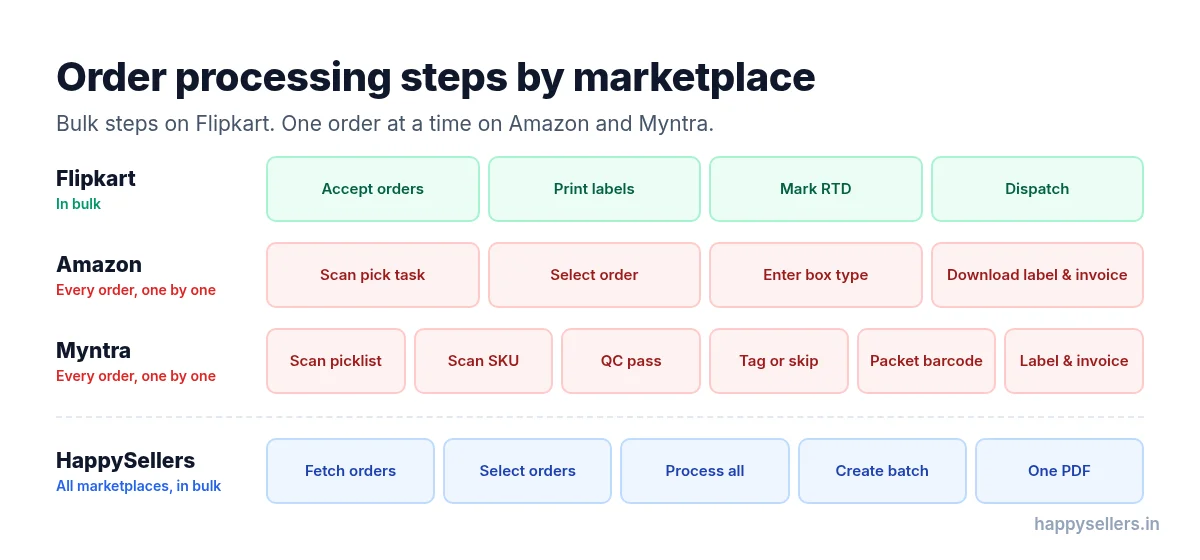
How long order processing takes depends on the marketplace. Some let you work in bulk. Others make you do every order one by one.
Flipkart: the fewest manual steps
Flipkart needs the fewest manual steps, because you can process orders in bulk:
- Accept: select the orders and click Accept.
- Print label: the orders move to the packing step. Select them and click Print label to get one PDF of their labels.
- Mark RTD: in the RTD tab, select the orders and click Mark RTD (ready to dispatch).
- Dispatch: the orders move to the Dispatch tab, and you pack and hand them over with the labels you already printed.
You do these steps for a group of orders at once, not for each order.
Amazon: every order, one by one
On Amazon, you do these steps for each order:
- Scan the pick task.
- Select the order.
- Enter the box type.
- Download the order’s label and invoice.
On a normal day that is manageable. With 5x or 10x the orders, it takes hours. Our guide to Amazon SellerFlex order processing explains the flow in more detail.
Myntra: the most steps per order
Myntra has two ways to process orders: with tags and without tags. The steps are:
- Generate a picklist from the orders and download the picklist PDF.
- Enter or scan the picklist ID.
- Scan the SKU of the product.
- Click QC pass.
- A pop-up asks for the tag. Sellers who use Myntra tags enter it. Sellers who do not, click Skip.
- Enter the packet barcode.
- The label and invoice for that order download.
Steps 3 to 7 repeat for every single order in the picklist. Read more in our guide to Myntra order processing.
AJIO, Nykaa, Meesho and Snapdeal
These work more like Flipkart. You can select many orders, do one or two steps such as accepting them, and then download the labels.
Do not spend the sale clicking through orders one by one. HappySellers processes your Flipkart, Amazon, Myntra, AJIO, Nykaa, Meesho and Snapdeal orders in bulk: fetch, select, process, create a batch and get one PDF. Start free with HappySellers, with free trial credits and no card required.
How HappySellers handles festive order volumes
With HappySellers, the steps are the same on every marketplace:
- Connect your marketplace accounts.
- Fetch the orders from a marketplace.
- Select the orders (for Amazon and Myntra, the pick lists) and click Process Orders.
- Create a batch of the processed orders.
- Download one PDF with all the labels and invoices, and start packing.
That is a few clicks for hundreds of orders, instead of a dozen clicks for each one. Our guide on how to print shipping labels in bulk shows how the batch PDF works.
Auto processing: let the orders process themselves
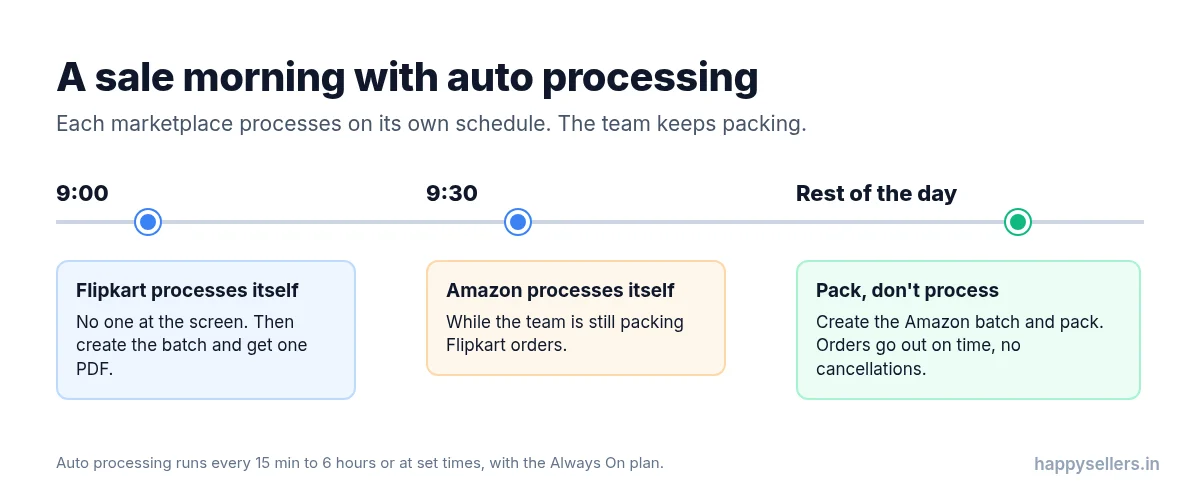
The most useful feature during a sale is auto processing. You schedule your order processing, and HappySellers processes the orders automatically at that time. You come back, create the batch, get the PDF and start packing. You do not need to sit at the screen while orders process.
You choose how often it runs:
- Every 15 minutes, 30 minutes, or every 1, 2, 3 or 6 hours, inside the working hours you set.
- Or at specific times, for example once a day.
Auto processing works for Flipkart, Amazon, Myntra, AJIO, Nykaa, Meesho and Snapdeal, and comes with the HappySellers Always On plan, which keeps your marketplace accounts connected even when your own computer is off.
A seller story: processing on a schedule, packing all morning
One seller schedules order processing in the morning, between 9 and 10 a.m., and schedules each marketplace at a different time.
- At 9:00 a.m., their Flipkart orders process automatically. On a busy day this takes a few minutes longer, but nobody has to watch it. When it is done, they create the batch and start packing the Flipkart orders.
- At 9:30 a.m., their Amazon orders process automatically while the team is still packing Flipkart. Then they create the Amazon batch and pack the Amazon orders.
They spend no time processing orders by hand. That time goes to packing and other work, which saves time, people and effort. It also protects their account health: orders are packed and dispatched on time, so they do not cancel or miss orders.
Let your orders process while you pack. Set a schedule once and come back to processed orders, ready to batch. Sign up for HappySellers, or talk to us about the Always On plan before the 2027 sale.
Packing: sort your batch the way your team packs
Once the labels are ready, packing is where the hours go. Sort the batch so your packers can collect all the units of a product at once and pack them together:
- Sort by SKU: all the orders for one product sit together. The packer goes to the rack once and packs every order for that SKU.
- Sort by SKU order count: the products with the most orders come first, so the biggest piles are packed early.
- Sort by courier (Meesho): orders are grouped by courier, so each courier’s parcels are ready together.
Read our step-by-step guide to SKU-wise packing, and see how Dot Prints gives you sorted labels.
Temporary staff and extra shifts
Festive sales can multiply your daily orders, and that puts pressure on your warehouse and packing team. Plan your people as carefully as your stock:
- Add temporary staff for picking and packing before the sale, and train them a few days ahead.
- Run extra shifts on the busiest days, so orders are packed before the dispatch deadline.
- Give each person one job: picking, packing or dispatch. Fewer handovers mean fewer mistakes.
- Keep the dispatch deadline visible to everyone on the floor.
Account health: why late dispatch and cancellations cost you
When orders pile up, it is tempting to cancel some or ship them late. Both hurt your account health.
When account health drops below what the marketplace expects:
- You get warnings from the marketplace.
- You may get fewer orders, because your products are shown less.
- Your account can be blocked if it keeps happening.
On Amazon, for example, sellers track the late dispatch rate, the cancellation rate and the order defect rate on the Account Health page. Check the targets in your own seller panel, and keep orders moving so you never have to cancel for lack of time or stock.
After the sale: returns and RTO
The sale does not end on the last sale day. Returns, cancellations and RTO (return to origin, when a parcel comes back undelivered) rise during and after festive sales, because more orders go out, many are impulse buys and many are gifts.
Know the difference, because each is handled differently:
- Customer return: the buyer received the product and sent it back.
- RTO: the parcel was not delivered and came back to you.
- Seller cancellation: you cancelled the order before shipping. This counts against your account health.
How to prepare for returns and RTO
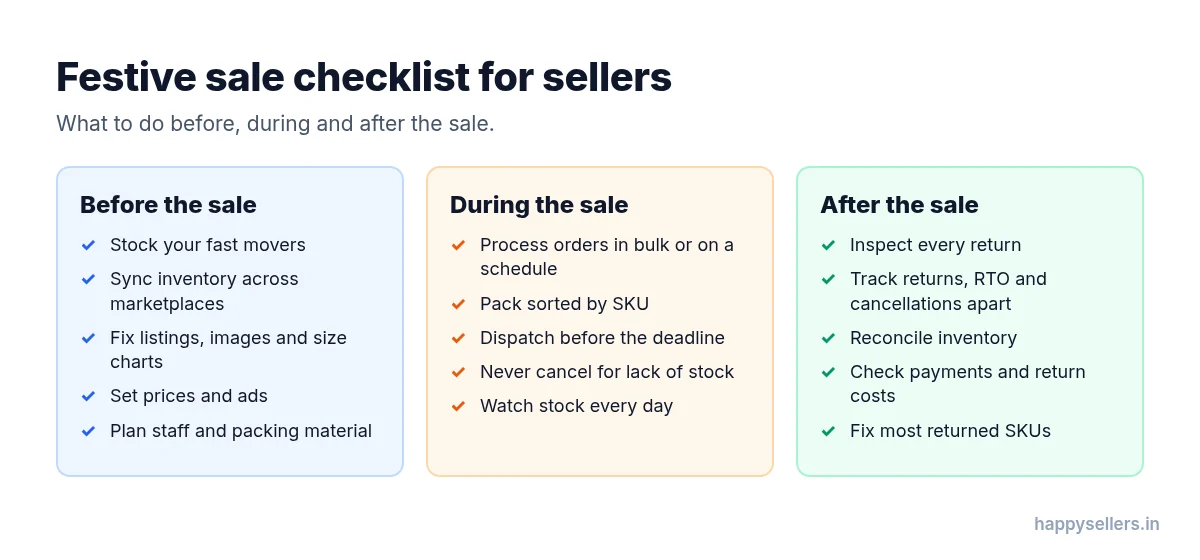
- Prepare for more returns. Keep enough people and space to inspect, process and restock returned products.
- Reduce return rates. Keep product descriptions, images, size charts and specifications accurate, so buyers get what they expected.
- Prevent RTO. Ship with accurate shipping information, pack properly and dispatch on time. Watch delivery exceptions and follow the marketplace’s process for them.
- Inspect every returned product. Check its condition, missing accessories and damaged packaging, and decide whether it can be sold again before adding it back to stock.
- Keep separate stock records for available, dispatched, returned, damaged and unsellable stock.
- Study return reasons. Find the SKUs that come back most and why: wrong size, damage or a product that does not match the listing.
- Track the money. Watch return shipping charges, refunds and reverse logistics costs, and what they do to your profit.
- Follow each marketplace’s own policy. Return windows and RTO rules differ, so check your seller panel for each one.
Post-sale checklist
- Count the returns and RTOs received, and match them against what the marketplace says is on its way back.
- Inspect each returned product and sort it into sellable, damaged or unsellable.
- Update your stock so the sellable returns are counted again.
- Raise claims with the marketplace for damaged, wrong or missing returns, within its deadline.
- List your most returned SKUs and fix their listing, size chart or packing.
- Reconcile your payments: check that every delivered order was paid and every deduction is correct.
- Write down what ran short this year, stock, packing material or people, and plan for it next time.
Payments are where many sellers lose money quietly after a sale. Our guide to payment reconciliation for Amazon and Flipkart sellers explains what to check.
Make 2027 your smoothest festive season yet. Inventory in one place, orders processed in bulk or on a schedule, labels in one PDF sorted the way you pack. Get your free HappySellers trial today, or see the pricing.
Quick summary
- The big three sales: Flipkart Big Billion Days, Amazon Great Indian Festival and Myntra Big Fashion Festival, with AJIO, Nykaa, Meesho and Snapdeal sales alongside.
- 2027 dates are not out yet. Expect late September or early October, before Diwali on 29 October 2027.
- Orders can jump 2x, 5x or 10x, depending on the seller.
- Stock first: going out of stock stops your orders. Keep inventory in sync.
- Prepare listings, prices, images, ads and sale registrations early.
- Amazon and Myntra take the most manual work per order. Flipkart and the others allow bulk steps.
- HappySellers processes orders in bulk, and auto processing processes them on a schedule while you pack.
- Protect account health: dispatch on time and do not cancel.
- After the sale, inspect returns, keep returns, RTO and cancellations apart, and reconcile stock and payments.
Frequently Asked Questions
When will the Flipkart, Amazon and Myntra sales start in 2027?
The 2027 dates are not announced yet. These sales usually start a few weeks before Diwali. In 2026, Amazon Great Indian Festival and Myntra Big Fashion Festival started on 8 October and Flipkart Big Billion Days on 9 October, with early access on 8 October. Diwali 2027 falls on 29 October, so expect the sales in late September or early October 2027.
What are the names of the big festive sales?
Flipkart runs The Big Billion Days (BBD), Amazon India runs the Great Indian Festival (GIF) and Myntra runs the Big Fashion Festival (BFF). AJIO, Nykaa, Meesho and Snapdeal run their own festive sales too, such as the AJIO All Stars Sale, the Nykaa Diwali Dhamaka Sale and the Meesho Mega Blockbuster Sale.
How many more orders do sellers get during festive sales?
It differs from seller to seller. Some sellers see about two times their normal daily orders, some five times and some even ten times. Plan your stock, team and packing for the high end.
What is the biggest problem for sellers during a festive sale?
Running out of stock. A product that shows out of stock stops getting orders right when demand is highest. Keep your inventory in sync across marketplaces so you always know what to restock.
Which marketplace takes the most manual work to process orders?
Amazon and Myntra. Both make you process one order at a time, with scanning and checks for each order. Flipkart, AJIO, Nykaa, Meesho and Snapdeal let you select many orders and process them in bulk.
What is auto processing in HappySellers?
Auto processing processes your orders on a schedule you set, every 15 minutes to every 6 hours or at fixed times. You come back, create the batch and get one PDF of labels to pack from. It works for Flipkart, Amazon, Myntra, AJIO, Nykaa, Meesho and Snapdeal, and comes with the Always On plan.
What happens if I miss dispatch deadlines or cancel orders during the sale?
Your account health drops. The marketplace may send warnings, show your products less and send you fewer orders, and if it keeps happening it can block your account.
How should I prepare for returns and RTO after the sale?
Keep people and space ready to inspect returns, check every returned product before it goes back into stock, track customer returns, RTO and seller cancellations separately, and study the most returned SKUs and their reasons.
Resources
- About Amazon India — Great Indian Festival 2026 dates
- Flipkart Stories — Announcements
- Flipkart — The Big Billion Days
- Myntra — Big Fashion Festival
- FashionNetwork — Meesho Mega Blockbuster Sale
- The Tribune — Nykaa unveils the Diwali Dhamaka Sale
- MediaInfoline — Snapdeal unveils Bharat Swagotsav sale
- Drik Panchang — Diwali dates
- Wikipedia — Return merchandise authorization